Skip to content
VisionDesk
Mac Host — Free Get VisionDesk
VisionDesk 1.0 is available now on the App Store

Your Mac.
Without the desk.

Real Mac displays, streamed into Apple Vision Pro as planes you can place, tilt, curve and save. Start with one complete display free. Shape up to five with Pro.

visionOS 26.5 or later  ·  Apple silicon Mac on macOS 26.5 or later  ·  Mac Host is free

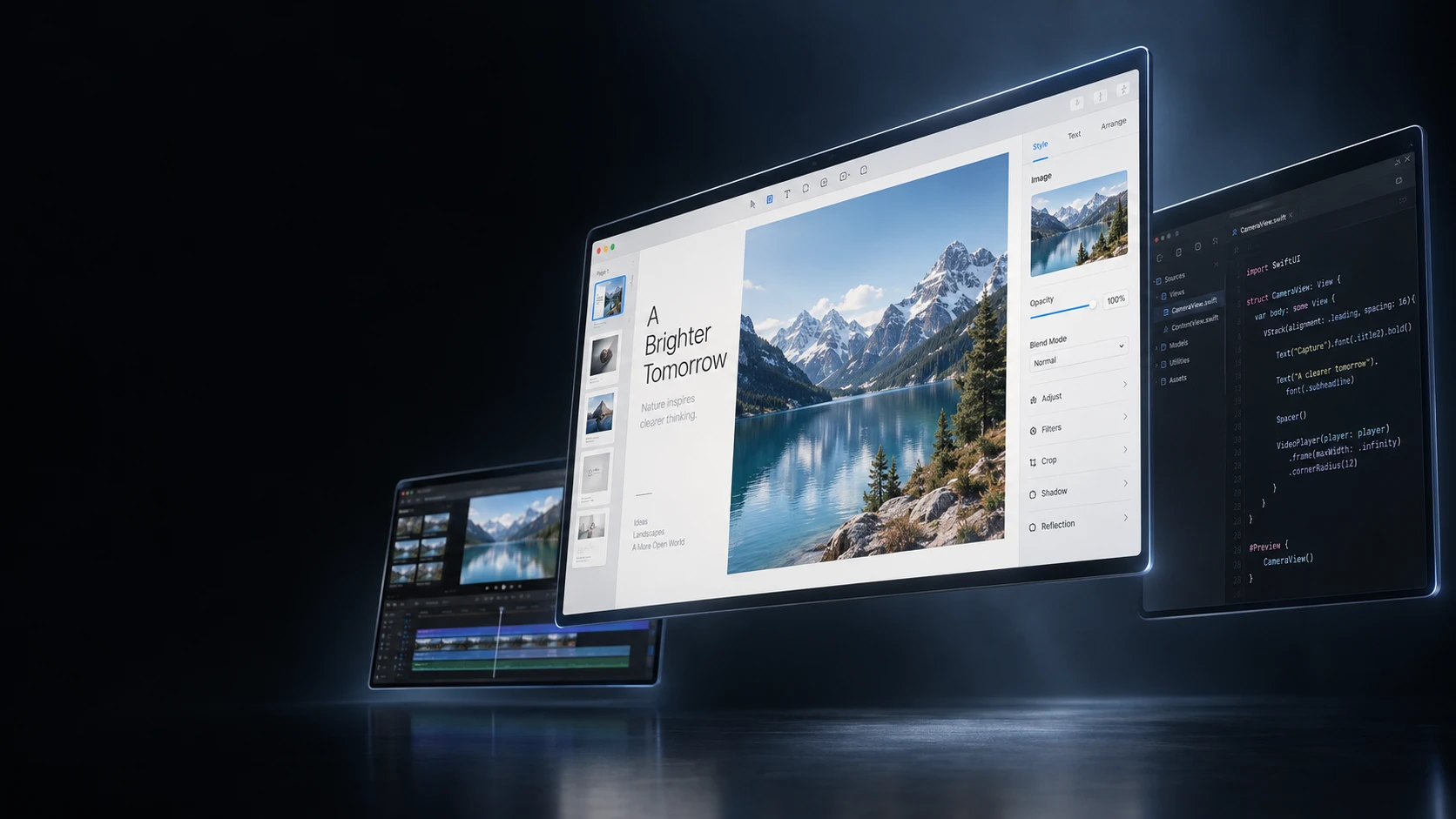
AI-enhanced presentation, based on the real app. Photographs shot through the headset are further down the page.

Recorded through the headset while VisionDesk was streaming a Mac. Nothing on this page is a mockup.

5
real Mac displays at once
90 Hz
per virtual display, matching the headset
1
complete display, free
0
accounts, cloud services, analytics events

The real interface

Use it before
you install.

A working recreation of the VisionDesk control panel, rebuilt from the app's own layout and values. Switch pages, pick a screen, drag the sliders — this is what the headset shows.

Playing a short demo — touch anything to take over
VisionDesk
View VisionDesk
Pro plans

Desk

3 screens · Curved
Live · MacBook Pro Disconnect
Live layout · tap a screen to edit it
Primary mirrors your Mac · 2560 × 1080 Exact placement on
Distance1.60 m
Size1.15 m
TiltFlat

In the headset: drag to move, pinch to resize, twist to turn. Values stay in sync with the Mac.

Layout Screens
3 of 5
Viewing radius
1.60 m
Starting points
Saved workspaces
Editing 3 screens · curved Load
Studio 3 screens · flat grid Load

Saved Workspaces and Precision Layout are VisionDesk Pro.

Keeps the Apple environment you selected in visionOS. If none is active, VisionDesk uses passthrough so your desk and keyboard remain visible.

Desk window A passthrough cutout onto your real keyboard and hands. Also in the dock.
Text clarity RECOMMENDED
Strength
40%

Sharpens small desktop text. No extra frame of latency.

Angled screens EXPERIMENTAL

Mipmaps reduce shimmer on strongly angled screens, at some GPU cost. Applies on the next connection.

Round trip2 ms
TransportUDP
Frames0 / 29 fps
Per-screen detail lives in the dock's Health tab.
Screens ready
Screens
3
Primary · mirrors your Mac
Resolution follows your Mac’s main display

Display

Layout · all screens

Exact placement on
Distance1.60 m
Size1.15 m
TiltFlat
BendFlat
Viewing radius1.60 m

Keeps the Apple environment you selected in visionOS. If none is active, VisionDesk uses passthrough so your desk and keyboard remain visible.

Immersion — the Digital CrownFull

Dial it down and the environment fades back to your real room — the screens stay exactly where you put them.

Desk window — passthrough cutout onto your keyboard
Round trip1 ms
TransportUDP
Dropped0 /s

Per-screen frame rate and decode latency, live while you work.

Type here to send text to the Mac

Pointer, click, scroll, keyboard and clipboard travel the same paired connection. Navigation and editing commands work without leaving the workspace.

Editing 3 screens · curved
Studio 4 screens · flat grid

Saved Workspaces and Precision Layout are VisionDesk Pro.

Live

A browser stand-in for the immersive space. The dock is the app's own, and the screens follow the layout, viewing radius, distance, size, tilt, bend and orientation you set. In Arrange mode drag a screen anywhere — left, right, up, down; hold Shift and the drag pushes it away instead. In the headset all three are one pinch-drag, and Reset puts every screen back on the layout. Environments are simplified: the headset shows your real visionOS environment, or your own panorama.

A browser recreation for the web. Its control ranges are the app's own: distance 0.4–6 m and a curved viewing radius of 0.6–3 m (DisplayLimits, WorkspaceSync.curveRadiusRange), tilt ±40° snapping to flat near zero, and size as the rendered diagonal in meters — the same numbers the app reports. The readouts start from the values in the captured session.

The honest comparison

You already have one Mac display in there.
This is for the other four.

visionOS includes Mac Virtual Display, and it is good: one screen, nothing to install, and an ultrawide option about as wide as two 4K displays side by side. VisionDesk begins where that stops — several separate displays, each placed by the meter, and an arrangement you can save.

What differs Mac Virtual DisplayBuilt into visionOS VisionDeskApp Store, plus the free Mac Host
Displays
Mac Virtual DisplayOne screen, as 16:9, wide, or an ultrawide about as wide as two 4K displays.
VisionDeskOne free. Two to five with Pro — each a separate display with its own resolution and aspect.
Placement
Mac Virtual DisplayMove it and resize it; it curves as it gets wider.
VisionDeskDistance 0.4–6 m, size, tilt and bend per screen, on a 0.6–3 m viewing radius. The same numbers on the Mac and in the headset.
Layouts
Mac Virtual DisplayOne screen, so there is nothing to arrange.
VisionDeskFlat grid, curved or mixed — saved as workspaces you can recall.
Sign-in
Mac Virtual DisplayThe same Apple Account, with two-factor authentication, on both devices.
VisionDeskNone. A one-time pairing code on your own local network.
Environment
Mac Virtual DisplayThe Apple environments built into visionOS.
VisionDeskThe Apple environments, or your own 360° or 180° panorama.
On the Mac
Mac Virtual DisplayNothing to install.
VisionDeskThe free Mac Host app, and Screen Recording permission.
Price
Mac Virtual DisplayIncluded with visionOS.
VisionDeskFree for one display. Pro is $7.99 a month or $59.99 a year.

Checked against Apple’s published Mac Virtual Display documentation for visionOS 26 in August 2026. If one screen is all you need, use Apple’s: it is already on your device, and it is free.

Precise by design

Your workspace.
Exactly how you want it.

Distance and physical size are real numbers in meters, not an abstract percentage — and Mac and Vision Pro read from one shared model. Drag to move, pinch to resize, twist to turn in the headset; refine the exact value on the Mac.

Distance
0.4 – 6 meters
Physical size
True-to-life scaling
Layouts
Flat, curved, mixed
Aspect
Portrait to ultrawide
  • Saved Workspaces remember count, aspect, resolution, position, depth, size, rotation, tilt and curve.
  • Precision Layout applies exact shared values across a multi-screen selection.
  • Change layout, curve or tilt on either device and the other follows.
VisionDesk — Arrangement
The VisionDesk Mac Host Arrangement page: three curved screens on the stage, layout modes, viewing radius and Precision Layout
Real macOS capture · Mac Host 1.0.1, Arrangement with Precision Layout
Three Mac displays arranged in a curved spatial layout above an alpine lake, with the VisionDesk dock beneath them

macOS treats them like monitors. Because they are.

The Mac Host provisions real virtual displays, so the cursor flows between screens, apps remember which monitor they belong to, and Spaces behave exactly as on physical hardware — at any resolution and orientation you choose.

AI-enhanced presentation, based on VisionDesk's real workspace behaviour.

Two apps, one workspace

Both sides,
newly redesigned.

The Mac Host gained a sidebar, focused pages and a session strip carrying the live connection. In the headset, a glass panel puts Desk, Workspace, Environment and Quality one tap apart. Every capture is the shipping app, not a mockup.

Screenshots of the running app — the headset pages from the visionOS Simulator, the Mac Host from macOS. Drag or scroll the row.

Shot through the headset

No render. This is
the view from inside.

Photographs taken on Apple Vision Pro while VisionDesk was streaming a MacBook Pro — real desktops, real curvature, real environment.

Three streamed Mac displays curved around the wearer in a snow-covered valley
Three screens · curved · 1.60 m viewing radius
A curved ultrawide Mac display beside a portrait display, streamed into Apple Vision Pro
An ultrawide bent around the viewer, beside a portrait screen

Built for real work

Low latency is a design constraint, not a slogan.

Capture runs through ScreenCaptureKit, encodes in hardware, and travels your own network. Nothing passes a VisionDesk server, because there is no VisionDesk server.

Apple silicon Mac Virtual displays · ScreenCaptureKit · hardware HEVC Main10
Your local network TCP 47823 control · UDP 47824 video · TLS and DTLS
Apple Vision Pro Decode · spatial render · text sharpening
Quality follows your focus

The active screen gets full bitrate; peripheral screens run lighter so the encoder never runs out of headroom. It uses the active screen and a privacy-preserving head-direction estimate — never raw eye tracking.

Text clarity without a queued frame

Single-pass contrast-adaptive sharpening keeps small desktop text readable, with a strength slider you control. Optional mipmaps reduce shimmer on strongly angled screens.

Standard, or Maximum Quality

Standard mode holds a latency-calibrated resolution ceiling. Maximum Quality lifts it to 4K when your network can carry it. H.264 stands in wherever HEVC is unavailable.

Mac audio and input

Audio, pointer, click, scroll and keyboard travel the same paired connection. Send text, navigation, clipboard and editing commands without leaving the workspace.

Built to recover

Bounded queues and stale-frame rejection protect latency. The headset re-pairs automatically after an app restart, a Mac sleep or a local-network interruption.

Health you can read

Live latency, round trip, packet loss, stale frames, decode percentiles and transport state — per screen, in the dock's Health tab.

Private by default

Your workspace stays yours.

VisionDesk does not phone home. Your displays stream from your Mac to your Vision Pro over your own network. On the App Store, its privacy label reads Data Not Collected.

No accountNothing to sign in to. Pair and work.
No cloud workspaceLocal network only. No relay, no internet pairing.
No analyticsNo telemetry, no advertising identifiers.
One permissionScreen Recording on the Mac, for the displays you stream.

The Mac Host's only other network call is the signed Sparkle update feed. Pairing material lives in the operating-system Keychain. Read the privacy policy.

Honest pricing

One display free.
Upgrade when you grow.

The free display is complete — full resolution, audio, pointer and keyboard. Pro is for the workspace that needs more than one.

VisionDesk Free

One complete spatial Mac display.

Free
  • Full stream quality and latency
  • Audio, pointer and keyboard input
  • Spatial and clarity controls
Get VisionDesk

VisionDesk Pro

Two to five displays and advanced control.

14-day trial
$7.99 / month $59.99 / year
  • Two to five Mac displays
  • Saved Workspaces and Precision Layout
  • Custom Photo environments
  • Family Sharing
Start your free trial

Mac Host

The companion that runs on your Mac.

Free
  • No subscription, ever
  • Developer ID signed and notarized
  • Published SHA-256 and signed updates
Download Mac Host

The 14-day trial is for eligible new subscribers and starts only after you confirm a plan in Apple's purchase sheet. The selected plan renews automatically unless cancelled. The App Store confirms local pricing and eligibility before purchase.

No fine print

What VisionDesk does not do.

Knowing the edges before you install is part of the product. These are the current limits, stated plainly.

  • Local network onlyThere is no cloud relay and no internet pairing. If the Mac and headset are not on the same private network, they cannot pair.
  • One Mac per sessionA headset pairs with a single Mac at a time.
  • Screen Recording is requiredmacOS will not let any app capture a display without it. Protected video services can still show a black image by design.
  • Apple owns its environment pickerPublic APIs do not let VisionDesk select a specific Apple environment. It keeps whichever one you chose in visionOS, and adds Custom Photo of your own.
  • Not on the Mac App StoreProvisioning real virtual displays uses a private macOS API that App Store apps may not use, so the Mac Host is a signed, notarized direct download.
Three streamed Mac displays curved around the wearer in a snow-covered valley, seen through Apple Vision Pro

Your Mac.
Without the desk.

Get VisionDesk from the App Store, then pair the free Mac Host on your local network. One display costs nothing.